
Heads
The number of heads is relative to the total number of sides of all the platters used to store data. If a hard disk drive has four platters, it can have up to eight heads. The maximum number of heads is limited by BIOS to 16.
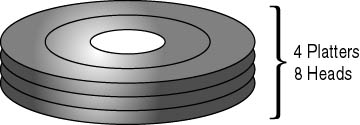
Hard disk drives that control the actuator arms using voice coil motors reserve a head or two for accuracy of the arm position. Therefore, it is not uncommon for a hard disk drive to have an odd number of heads.
Some hard disk drive manufacturers use a technology called sector translation. This allows some hard drives to have more than two heads per platter. It is possible for a drive to have up to 12 heads but only one platter. Regardless of the methods used to manufacture a hard drive, the maximum number of heads a hard drive can contain is 16.
Sectors per Track
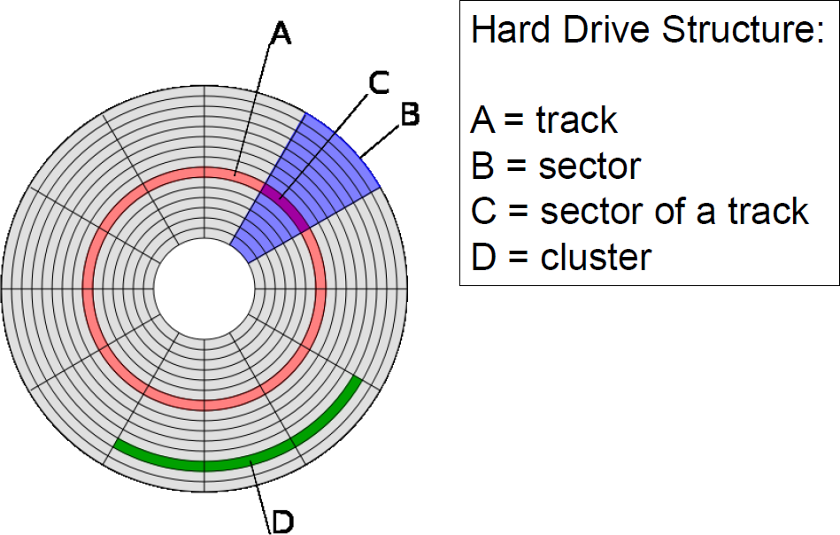
A hard disk drive is cut (figuratively) into tens of thousands of small arcs, like a pie. Each arc is called a sector and holds 512 bytes of data. The number of sectors is not important and is not part of the geometry; the important value is the number of sectors per track. BIOS limitations set the number of sectors per track at 63.
Cylinders
Corresponding tracks on all surfaces on a drive, when taken together, make up a cylinder
Data is stored in circular paths on the surface of each head. Each path is called a track. There are hundreds of tracks on the surface of each head. A set of tracks (all of the same diameter) through each head is called a cylinder. The number of cylinders is a measurement of drive geometry; the number of tracks is not a measurement of drive geometry. BIOS limitations set the maximum number of cylinders at 1024.
Landing Zone
A landing zone defines an unused cylinder as a „parking place” for the R/W heads. This is found in older hard disk drives that use stepper motors. It is important to park the heads on these drives to avoid accidental damage when moving hard disk drives.
CHS Values
Cylinders, heads, and sectors per track are known collectively as the CHS values. The capacity of any hard disk drive can be determined from these three values.
The maximum CHS values are:
- 1024 cylinders.
- 16 heads.
- 63 sectors per track.
- 512 bytes per sector.
Therefore, the largest hard disk drive size recognized directly by the BIOS is 504 MB. Larger drive sizes can be attained by using either hardware or software translation that manages access to the expanded capacity without direct control by the system BIOS.
1024 x 16 x 63 x 512 bytes/sector = 528,482,304 bytes (528 million bytes or 504 MB)
There are many hard disk drives that are larger than 504 MB. These drives manage to exceed this limitation in one of two ways: either they bypass the system BIOS (by using one of their own) or they change the way the system BIOS routines are read. (For a fuller discussion of this, refer to Tutorial 9, „High-Capacity Disk Drives.”)
Access time
The time it takes to move the read/write head to the desired cylinder is called the seek time. Blocks can be addressed by specifying the cylinder, head and sector numbers of the block („CHS”). The time it takes for the desired sector to rotate into position under the read/write head is called the latency; timing marks are recorded on the disc to facilitate sector location. The sum of the seek time, the latency and the read time is called the access time.
Clustrer is group of sectors
A sector is the smallest unit that can be accessed on a storage device like an HDD or SSD. A cluster, or allocation unit, is a group of sectors that make up the smallest unit of disk allocation for a file within a file system. In other words, a file system’s cluster size is the smallest amount of space a file can take up on a computer.
Most files require a large number of clusters, which means the file contents are spread across multiple clusters on the drive. Often the data can be written in contiguous blocks so that the file contents are stored in one physical location. However, when a hard drivebegins to fill up, there may not be enough contiguous clusters available to save large files in a single area. Instead, they must be written in multiple locations on the disk. This is called fragmentation and can slow down the hard drive’s read and write speeds. (https://techterms.com/definition/cluster)
http://kias.dyndns.org/comath/42.
http://www.brainbell.com/tutors/A+/Hardware/_Geometry.htm